Session open
Start
Note
Start the session. Keep the note. tagline: invented — replace me
Section 01 · proposed
Brand Overview
The capture console: hands anywhere, session running, note keeping itself.
Start Note began as a note-taking app with a stopwatch in the title bar (v1: notes, tables, audio, a timer always one tap away). It is becoming something sharper: a voice-session console (v2) — a black screen, a Bluetooth remote in your pocket, and four channels a button-press apart: talk to the AI, pause it, transcribe only, or just record. The note is no longer something you write. It's something a session leaves behind.
- Mission invented
- Remove every step between deciding to capture and capturing. Start means now.
- Vision invented
- Every walk, drive, and workbench hour can end in a keepable note — without a screen ever being touched.
- Audience invented — sharpen at review
- Builders and thinkers who talk faster than they type: solo developers, tradespeople mid-task, drivers, walkers. Concretely: Brett with a MITER remote clipped to a strap.
Personality
- Instant
- One press to live. No onboarding, no confirmation dialogs, no spinner language.
- Hands-free
- Designed to be operated blind, from a pocket. The screen confirms; it never demands.
- Honest
- The UI states facts in mono: LIVE, STANDBY, Unmapped, Session Ended. Never mood, never apology.
- Dark until signal
- Pure black at rest. Color exists only to carry state — a lit border means something is happening.
Provenance: personality distilled from v2's actual UI behavior [context], names invented.
Construction principles — live
-
State is a color. Every channel owns exactly one accent; the border, the dot, and the status line all wear it. Nothing else on the surface is colored.
NO CHANNEL
STANDBY
-
Start means now. The v1 stopwatch lived in the app bar — capture begins the instant you decide. Tap the chip; it runs. Tap again; it holds.
-
Dark until signal. Surfaces are black; borders are near-black. Light is spent only where a state changed. (Watch this document's own nav — the active section carries a pulsing channel dot.)
-
Mono carries data, sans carries prose. 03:41:07 · physical: ArrowLeft (0x50) · LIVE is monospace and tabular; this explanatory sentence is not. The two never swap jobs.
-
Session in, artifact out. Every session must end in something keepable — a note, a transcript, a recording, a mark. A feature that doesn't feed the artifact doesn't ship.
Section 02 · proposed
Logo System
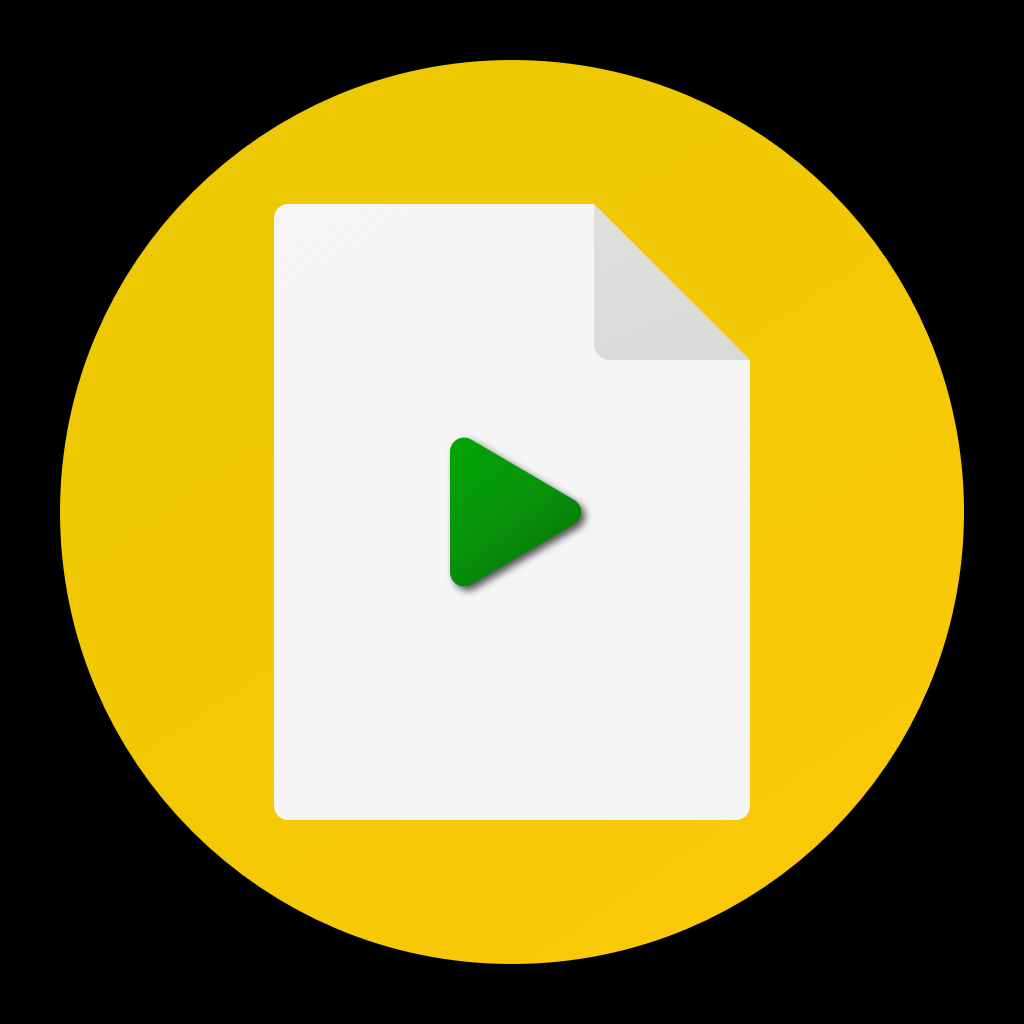
One real mark exists: the v1 launcher — a white page with a green play triangle on a gold disc. Press play on a document.
Clear space & minimum sizes proposed
Clear space: the height of the play triangle (≈ 1/3 of the disc) on all sides. Derived from the mark itself; unverified against any real layout.
Do
- Use the mark as shipped — full-color disc on dark surfaces.
- Keep it circular; the disc is the avatar crop.
- Pair with the wordmark set in the display mono, uppercase, tracked.
Don't
- Recolor the play triangle — green is the only play.
- Place the gold disc on the amber surface without a contrast ring.
- Stretch, add shadows, or rotate the page glyph.
- Redraw the mark from memory — the PNG is the source until vectorized.
Section 03 · proposed
Color
Black console, grey ink, four channel signals, one heritage gold. Where v1 and v2 disagree, v2 wins — v1 survives below as history (and as the encoded heritage toggle in the sidebar).
The console — surfaces context · v2
The four channels — state is a color context · v2 _colorForChannel
Brand gold context · mark + v1 "amber"
Amber is the through-line: the disc of the mark, v1's named theme color, and v2's learning state all reach for it. It is the brand's identity color, while live green is the brand's pulse. Which one leads the documents is an open decision — flip ACCENT → amber in the sidebar to read this entire book the other way.
Heritage — the v1 palette context · historical, not for new work
Contrast — measured, honest
| Pair | Ratio | WCAG AA |
|---|---|---|
| Ink on Console | 21.0 | PASS |
| Soft on Console | 11.2 | PASS |
| Dim on Console | 7.7 | PASS |
| Faint on Console | 4.6 | PASS (barely) |
| Faint on Card | 3.5 | FAIL — micro-labels only, never body |
| Live green on Console | 14.7 | PASS |
| Pause amber on Console | 15.0 | PASS |
| Transcript cyan on Console | 16.8 | PASS |
| Record red on Console | 6.6 | PASS |
| Brand amber on Console | 12.7 | PASS |
| Brand amber on White | 1.7 | FAIL — amber is a surface/identity color, never light-mode text |
Pairing rules
- Prose is white or soft-grey on black — nothing else.
- Channel colors carry state: borders, dots, status lines, readouts. Never paragraphs, never decoration.
- One channel color per surface at a time — a console showing two lit channels is a bug, not a style.
- Amber on dark only. On light ground it needs black ink on top of it (the v1 scaffold pattern).
- No gradients anywhere. The brand's depth is black-on-black, not blends. invented — both repos are gradient-free
Section 04 · proposed
Typography
The app ships system faces and asks for 'monospace' by name whenever data appears. The doc pairing below makes that instinct official.
IBM Plex Mono invented — app uses generic 'monospace'
03:41:07 · physical: ArrowLeft (0x50)
Display + data. Channel headers, timers, key readouts, kickers. Tabular figures always on for time.
IBM Plex Sans invented
The note is what the session leaves behind.
Prose, labels, note content. Weights 400–600 only.
Live
HERO · mono 700 · clamp(2.3–4.2rem) · uppercase · +0.06em
No Channel
H1 · mono 700 · clamp(1.7–2.5rem) · uppercase · +0.04em
Learning mode
H2 · mono 700 · clamp(1.3–1.85rem)
Button mappings
H3 · sans 600 · clamp(1.08–1.3rem)
Press any remote button and the console cuts to its channel without a tween.
BODY · sans 400 · 0.94–1.02rem · lh 1.65
Unmapped: KeyZ (0x7001d)
DATA · mono 400 · 0.87rem
Channel: transcript · learned 2026-08-04
CAPTION · sans 400 · 0.78rem · dim
App scale context
| Level | Value | Source |
|---|---|---|
| Channel header | 20 bold · tracking +2 · UPPERCASE | v2 status bar |
| Stopwatch | 22 · tabular figures | v1 app bar |
| Title / body / caption | 28 / 16 / 12 | v1 theme |
| Status / sub / micro | 14 / 13–12 / 11 mono | v2 widgets |
Do
- Tabular figures on every timer and count — digits must not jiggle.
- Uppercase + tracking (+0.1em) for channel/state words: LIVE, STANDBY.
- Keep mono for machine facts, sans for human sentences.
Don't
- Set prose in mono — the sniffer is a readout, not a voice for paragraphs.
- Use more than two weights per surface.
- Fake bold, stretch, or outline anything.
Section 05 · proposed
Iconography
Material Symbols, filled, small, and state-colored. The dot is the most important icon in the system, and it isn't from a library.
In-app set [context]: Icons.circle, radio_button_unchecked, settings_remote, hearing, more_vert, delete, settings, create — Material, filled, 16–24px.
Rules context + proposed
- Library: Material Symbols, filled style, no custom set. context
- Sizes: 16 (inline state) · 20 (actions) · 24 (navigation). context
- Color = state: an icon is grey until its channel is active, then it wears the channel color. Icons are never decorative accents.
- The status dot (a plain filled circle) outranks any glyph — when in doubt, use the dot.
- Never on gradients (there are none), never multi-color, never outlined-and-filled mixed on one surface.
Section 06 · proposed — no imagery exists anywhere in either repo
Photography & Illustration
A direction, not a collection. Everything below is invented and waits for the first real shot.
Art direction invented
- The desk at night
- One practical light source, screen glow, black falloff. The photography restates the UI: dark until signal.
- Hardware in hand
- The remote in a real hand — pocket, strap, steering wheel. Capture is physical; show the button, not the app store screenshot.
- Mid-task, not posed
- The subject is doing the other thing (walking, soldering, driving a nail). Start Note is never the activity — it's the witness.
Do
- Underexpose; let black be black.
- Let the channel colors appear only as real screen glow.
Don't
- Stock laptop-and-latte imagery.
- Fake UI mockups presented as product truth.
Section 07 · proposed — the "none" stance
Mascots & Characters
Start Note has no characters, and that is the position, not an omission.
The brand's only figure is the mark's play-page glyph — a document you can press play on. It is a symbol, not a character: it does not speak, emote, or appear in poses. A capture tool that stays out of your way should not introduce a personality that gets in it.
If one ever appears proposed rule
- It must be earned by the product (e.g. a voice-assistant persona for the conversation channel), never bolted on for marketing.
- It speaks in the section-12 register: terse, factual, mono.
- It never appears inside the console UI — the black screen stays clean.
- Note: Start Note is staged in the Potatuhs workbench; if it is ever folded into that universe, characters arrive via that decision, recorded here first.
Section 08 · proposed — rebuilt live from tokens, from the real v2 widgets
UI Components
The status console, the mapping tile, the sniffer, the timer chip. Everything below is interactive — press it.
Status console context
NO CHANNEL
STANDBY
Learned: ArrowLeft
Anatomy: card surface · state border (1px rest → 2px lit) · dot + channel name (mono 700, +0.1em, uppercase) · state line · last-event chip. Same channel again = live/standby toggle, exactly like the bloc.
Sniffer readout context
Timer chip context · v1 global timer
tap: start/hold · grey idle → live green running
Buttons derived
Mapping tiles context
In situ — the config screen, composed from the pieces above
TRANSCRIPT
LIVE
Section 09 · proposed
Shadows & Borders
There are no shadows. On a black console nothing can cast one — elevation is a border, and the border carries state.
The border scale context
| Weight | Color | Means |
|---|---|---|
| 1px | line grey | at rest — structure only |
| 1.5px | pause amber | learning — waiting on input |
| 2px | channel color | LIVE — something is happening |
Radii context — 6/8/10/12 observed in v2
| Token | Used for |
|---|---|
| --r-sm 6px | key chips, small labels |
| --r-md 8px | timer chip, buttons |
| --r-lg 10px | mapping tiles, sniffer |
| --r-xl 12px | the status console |
| --r-pill | dots, avatar crop |
Shadow token: --sh-none. If a design needs depth, it needs a border decision instead.
Section 10 · proposed — durations invented; behaviors extracted
Motion
Two moves only: the cut and the pulse. Channels CUT — no tween between states. Live things PULSE — a slow breath, never a spin.
| Token | Value | Use |
|---|---|---|
| --dur-fast | 120ms | press feedback, border light-up |
| --dur-normal | 240ms | panels, nav drawer |
| --dur-slow | 480ms | document reveals only |
| --dur-pulse | 1200ms | live dot breath |
| --ease-out | cubic-bezier(0.2, 0, 0, 1) | everything that moves |
| --ease-cut | steps(1, end) | state changes — never tweened |
- State never animates. A channel switch is a cut; an eased border-color crossfade would misreport when the state changed. (The 120ms light-up is feedback on press, not a state tween.)
- Only what's alive moves. One pulsing dot per screen, on the live thing. Nothing else loops.
- Transform and opacity only. No layout animation, ever.
- Reduced motion: pulses stop and hold solid; cuts are already instant; reveals render visible. respected — verify in this doc
Section 11 · proposed
Layout
The app is a single black column with a 16px gutter. The document system wraps that instinct in three containers.
Containers proposed · doc system
App layout context
- One column. The console never goes multi-pane on a phone.
- 16px horizontal gutter (EdgeInsets 16 throughout v2).
- Status console pinned at top; readouts at bottom; the list breathes between.
Spacing — 4px base context: 4/8/12/16/20 rhythm in v2
Section rhythm: clamp(4rem, 8vw, 7rem) vertical padding; surfaces alternate console-black / panel; no dividers — the surface change is the divider.
Section 12 · proposed — samples are real strings from the apps
Voice & Tone
The status-line register: state facts, present tense, no fluff. The UI talks like a flight recorder, not a coach.
States facts. Never apologizes. Never cheers.
In the voice context · shipped v2 strings
Press any remote button…
LEARNING MODE — press a button on the remote
Learned: ArrowLeft
Mark @ 2026-08-04T09:12:44
Session Ended
Retired register context · v1, do not revive
UH oh! Error loading notes. Tab anywhere to fix this.
v1's whimsy ("UH oh!") is retired with v1. Errors state what happened and the one action available — no exclamation marks, no blame, no mascot energy.
Words we use
- session · channel · mark
- live · standby · learn
- start · end · unmapped
- note · transcript · recording
Never
- "recording in progress…" (verbose state)
- "oops", "uh oh", "please wait"
- "smart", "magic", "AI-powered" as adjectives
- exclamation marks in system text
Tone by context proposed
| Context | Register |
|---|---|
| Status lines / system | Mono, uppercase state words, ≤ 6 words |
| Errors | What happened + the one available action. Full stop. |
| Marketing | Sans, second person, one verb up front: "Start the session." |
| Docs | This document's register — plain, specific, provenance-labeled |
Section 13 · proposed — stance derived from the product's own architecture
AI Policy
AI is a channel you switch to — never ambient, never assumed.
AI-assisted, channel-scoped, color-disclosed.
The v2 architecture is the policy: the AI voice model may respond only on the conversation channel. The transcript channel is STT-only — no AI response by construction. Audio record touches no model at all. The user always knows which mode they're in, because the screen is wearing that channel's color: the disclosure is the UI.
Rule: no AI processing may occur on a channel whose contract excludes it. Adding AI to a channel is a spec change here first, code second.
| Surface | AI | Contract |
|---|---|---|
| Conversation channel | PERMITTED | free-form exchange with the voice model [context] |
| Pause channel | HELD | buffers input; AI response held until resumed [context] |
| Transcript channel | FORBIDDEN | STT only, no AI response [context] |
| Audio record | FORBIDDEN | raw mic capture, no models [context] |
| The user's notes | HUMAN-OWNED | AI may draft into a session; the kept note is the user's [proposed] |
Section 14 · proposed
Sub-brands & Ecosystem
One brand, two generations. The hardware it rides on is a partner, not a sub-brand.
Generation 1 · heritage
Start Note (v1)
Notes · tables · audio · the stopwatch app bar. Amber-scaffold identity. Flutter + BLoC + SQLite. Status: historical reference; its palette and stopwatch survive as heritage tokens and the sidebar toggle.
Generation 2 · current — this book's baseline
Start Note (v2)
The voice-session console: channels, remote control, learning mode. Black-console identity. In development; where the generations disagree, v2 governs.
Partners & hardware
- MITER remote — the reference BT controller [context]. Third-party hardware: named in UI as a device profile ("MITER Remote"), never co-branded, never in the logo's clear space.
- Any BT HID device may be a controller — profiles are data, not brand surfaces.
Section 15 · proposed
Asset Naming & Governance
One spec, one direction of travel: DESIGN.md → tokens → app theme.
Naming proposed — house convention
startnote-{category}-{label}-{variant}.{ext}
| Example | What |
|---|---|
| startnote-logo-mark-full.svg | the vectorized mark (todo) |
| startnote-icon-channel-live.svg | channel dot asset |
| startnote-photo-remote-hand-1.jpg | first hardware shot |
Formats
- Marks: SVG source, PNG exports at 512/192/64/32/16.
- Tokens: this folder's tokens.css + tokens.json, generated together, never edited apart.
The SSOT chain
- DESIGN.md (beside this file) is the spec. The site renders it; when they disagree, the site is wrong.
- tokens.css / tokens.json are the machine contract consumers read.
- start_note_v2 consumes downstream: colors currently live inline in widgets — extract a lib/theme/ that mirrors these tokens at reingest.